Application environments corresponding to LCD screens of different brightness

Application environments corresponding to LCD screens of different brightness levelsThe brightness of a LCD screen
Application environments corresponding to LCD screens of different brightness levels
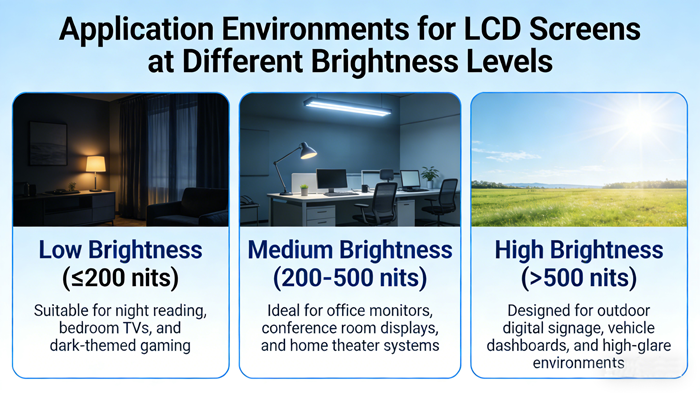
The brightness of a LCD screen (usually measured in nits) directly determines its visibility in different lighting environments. Choosing a screen with appropriate brightness requires finding a balance between outdoor readability, eye comfort, and power consumption.
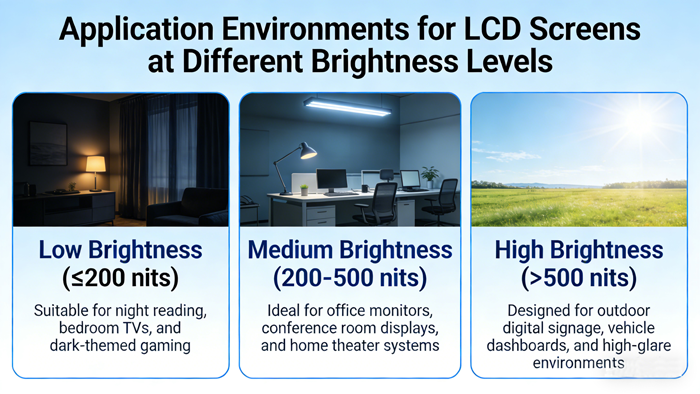
The following are typical application environments and devices corresponding to different brightness levels:
1. Low brightness level (0-250 nits)
Applicable environment: No ambient light, dark room, or controlled indoor lighting.
Environmental characteristics: There is no sunlight at all, only dim lighting or complete darkness.
Reason: The human eye is very sensitive in the dark. A screen that is too bright can feel dazzling and cause eye fatigue. Low brightness ensures visual comfort.
Common devices/scenarios:
Professional monitors/post production editing: Film color rooms typically operate in low light environments, with monitor brightness calibrated at around 100 nits.
Bedroom TV/projector: When turning off the lights to watch at night, the brightness needs to be lowered.
Old style mobile phones/low-end devices: some indoor positioning devices (such as remote controls, smart home panels).
2. Medium to low brightness levels (250-350 nits)
Applicable environment: ordinary indoor office, daily household use.
Environmental characteristics: There is stable indoor lighting and no strong direct sunlight.
Reason: This is the most common brightness standard for LCD screens. Capable of combating interference from indoor ordinary lighting, with good power consumption and heat control.
Common devices/scenarios:
Office monitor: The typical brightness of most desktop monitors.
Ordinary laptop: suitable for indoor or cool use.
Non HDR (non high dynamic range) TV: Watch under regular living room lighting.
3. Medium brightness level (350-500 nits)
Applicable environment: bright indoor (window side), cloudy outdoor, shaded areas.
Environmental characteristics: The ambient light is strong, with scattered light from windows or diffuse reflection light on cloudy days.
Reason: Higher brightness is needed to "suppress" the reflection of ambient light on the screen surface and maintain clear image.
Common devices/scenarios:
High end office/design monitors: provide higher brightness margin to cope with complex lighting conditions.
Mainstream smartphones: The maximum value of most phones in manual brightness mode.
Outdoor information kiosks/self-service devices: usually equipped with sunshades to match this brightness range.
4. High brightness level (500-1000 nits)
Applicable environment: Outdoor direct sunlight during the day, professional HDR content production.
Environmental characteristics: Strong sunlight shining directly on the screen, resulting in extremely severe glare reflection.
Reason:
Oppose strong light: According to physical laws, the screen must emit enough light to cover the reflected light of the sun, otherwise the screen looks like a mirror.
HDR display: High dynamic range content requires high brightness to present highlight details such as the sun and lighting.
Common devices/scenarios:
Outdoor mobile phone: It is essential to view maps or take photos in the sunlight.
Outdoor industrial control screen/car display screen: The car center control screen must reach this level in convertible cars or under direct sunlight.
HDR TV/monitor: High end TVs can display HDR peak brightness with local brightness up to 1000 nits.
5. Ultra high brightness level (1000-2000+nits)
Applicable environment: extremely strong outdoor direct light, specific professional scenarios, new generation HDR standards.
Environmental characteristics: Strong light near the equator, snow/beach reflection, scenes requiring ultra-high contrast.
Reason:
Excitation mode: Typically, this brightness is only briefly reached in the "Sunshine Readability Enhancement" mode or when playing specific HDR highlights, and maintaining it for a long time will generate heat and consume power.
Mini LED/Micro LED technology: Screens using this backlight technology can achieve such high peak brightness.
Common devices/scenarios:
Flagship smartphones: For example, some brands claim that the local peak brightness can reach 1500-2000 nits, optimized for outdoor strong light viewing of photos/videos.
Professional outdoor handheld devices: geological exploration and surveying equipment.
HDR movie shooting monitor: on-site viewing of HDR shooting effects.
6. Special field: Ultra high brightness industrial screen (>2500 nits)
Applicable environment: Semi outdoor/all-weather exposure.
Environmental characteristics: Direct sunlight without obstruction, requiring 24-hour operation.
Reason: Ordinary LCD screens will rapidly age and become completely blurry due to high temperatures and strong light in this environment. It is necessary to use a super bright screen and usually paired with an automatic light sensor (bright during the day and dim at night to extend its lifespan).
Common devices/scenarios:
Bus stop signs/outdoor advertising machines: Pedestrians need to see the route information clearly in the sunlight.
Gas station/ATM: Consider visibility under various weather conditions.
Summary and purchasing suggestions
Indoor fixed use (desktop computer, TV): Focus on 250-400 nits, higher brightness can be dazzling in a dark room.
Indoor and outdoor mobile use (laptops, tablets): It is recommended to use 400 nits or more to ensure a comfortable experience for window seats or occasional outdoor use.
Heavy outdoor use (mobile phone, car): It is recommended to use 600 nits or more, preferably with the "readability improvement under sunlight" function.
HDR viewing: Focus on peak brightness (usually the highest brightness that can be reached in a short period of time), with noticeable HDR effects above 800 nits.
TFT LCD:https://www.idtdisplay.com/
AUO LCD DISPLAY:https://www.idtdisplay.com/products/AUO_LCD_Displays/