What factors can affect the brightness of LCD screens?

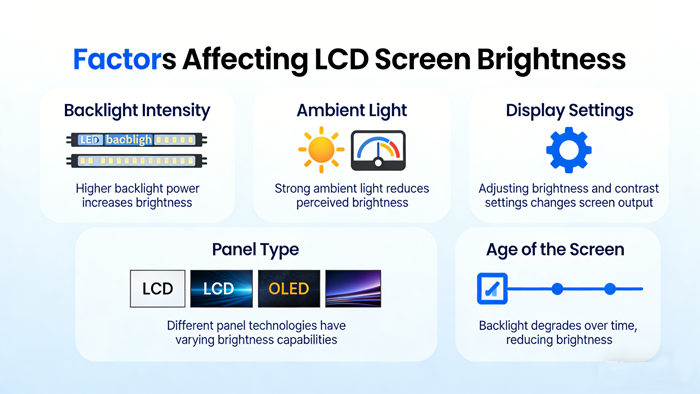
The liquid crystal screen (LCD) itself does not emit light, and its brightness mainly depends on the backlight system and the efficiency of light passing through the LCD panel Therefore, the factors affecting the brightness of LCD screens can be analyzed
What factors can affect the brightness of LCD screens?
The liquid crystal screen (LCD) itself does not emit light, and its brightness mainly depends on the backlight system and the efficiency of light passing through the LCD panel. Therefore, the factors affecting the brightness of LCD screens can be analyzed from three dimensions: light source, panel characteristics, and external environment.
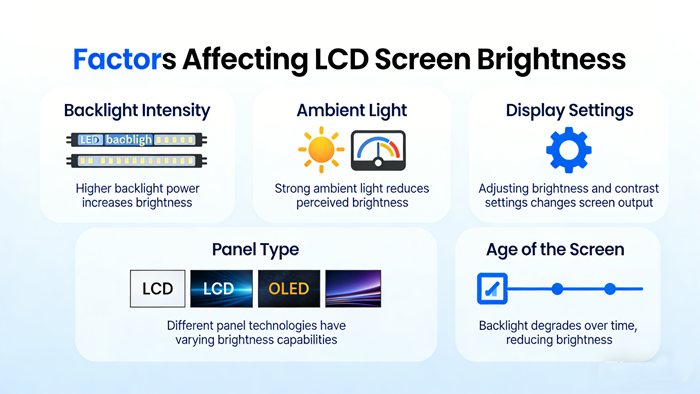
The following are the main influencing factors:
1. Characteristics of backlight system
The backlight module is the fundamental source of brightness, and its hardware configuration directly determines the upper limit of brightness.
Backlight type:
CCFL (Cold Cathode Fluorescent Lamp): The backlight used in old-fashioned LCD screens has relatively low brightness and decays quickly over time.
LED (Light Emitting Diode): Currently mainstream. Its brightness and energy efficiency are much higher than CCFL. Different LED bead quality and arrangement methods (such as side in and direct down) can affect the uniformity and peak brightness.
Mini LED: Using smaller light beads, it can achieve higher peak brightness and finer area dimming, and its brightness performance is usually better than ordinary LED.
Lamp bead aging and light decay: All backlight sources will experience light decay (gradually decreasing brightness) with increasing use time. After prolonged use, the maximum brightness of the screen will significantly decrease.
Drive circuit and dimming mode:
DC dimming: By adjusting the current/voltage to change the brightness, the dimming process is smooth.
PWM dimming: Adjust brightness by quickly switching the backlight on and off alternately. Although not easily noticeable to the human eye, the frequency and duty cycle of PWM directly affect the perceived brightness.
2. LCD panel and optical film
After light is emitted from the backlight, it needs to go through multiple layers of structure to reach the human eye, which results in a significant loss of light.
Deflection efficiency of liquid crystal molecules:
Voltage control: The magnitude of the voltage applied to the liquid crystal molecules determines the degree of molecular twist, thereby controlling the amount of light passing through.
Response speed: In high-speed changing images, if the deflection speed of liquid crystal molecules cannot keep up, it will result in insufficient instantaneous brightness.
Panel type:
IPS (Plane Conversion): Low transmittance but wide viewing angle.
VA (Vertical Alignment): With high transmittance and native contrast, it may feel brighter under the same backlight.
TN (twisted nematic): The highest transmittance, but with poor color and viewing angle.
Polarizers and filters:
Polarizing film: Poor quality or aged polarizing films will absorb too much light, reducing brightness.
Color filter: The transmittance of the filter determines the purity and brightness of the color. High transmittance filters can make the image brighter.
Brightening film/diffuser: The optical film inside the LCD module (such as prism film, DBEF (reflective polarizing brightening film), etc.), if aged or poorly designed, will reduce the utilization of light.
3. External environment
Environmental light intensity (glare): Under bright sunlight, the reflected light on the screen surface will cover the light emitted by the screen, causing the human eye to feel that the screen has darkened (in fact, it is difficult to see clearly). This belongs to the perception of brightness being affected.
Ambient temperature
The response speed of liquid crystal will slow down at low temperatures, and the viscosity will increase, resulting in temporary decrease in brightness or display ghosting.
Excessive temperature may accelerate the aging of backlight LEDs and even cause protective frequency reduction of the driving circuit (reducing brightness to dissipate heat).
4. Software and Circuit Control
Brightness setting: The brightness slider in the operating system or monitor menu directly controls the output power of the backlight driver circuit.
Automatic brightness adjustment: The ambient light sensor will automatically adjust the screen brightness based on the strength of external light.
Dynamic contrast/content adaptation: Some monitors or televisions will dynamically adjust the backlight based on the current picture content. When displaying dark scenes, the backlight will automatically decrease (to enhance contrast), resulting in a decrease in overall brightness.
Power saving mode/battery status: In battery powered mode, the device will automatically limit brightness to save power.
HDR (High Dynamic Range) mode: When playing HDR content, the driver circuit will attempt to excite higher peak brightness, but at the same time, it may quickly fall back due to heating.
summary
Simply put, hardware physical aging (light decay), environmental temperature, type of LCD panel, and system power and heat dissipation strategies are the core factors that affect the long-term and instantaneous brightness of LCD screens.
TFT LCD :https://www.idtdisplay.com/
AUO LCD DISPLAY:https://www.idtdisplay.com/products/AUO_LCD_Displays/