How to choose an industrial display?

The key to choosing an industrial display screen lies in ensuring that it can stably, reliably, and clearly fulfill its display tasks in a specific industrial environment This is far more than just "choosing a screen "; it is a systematic project
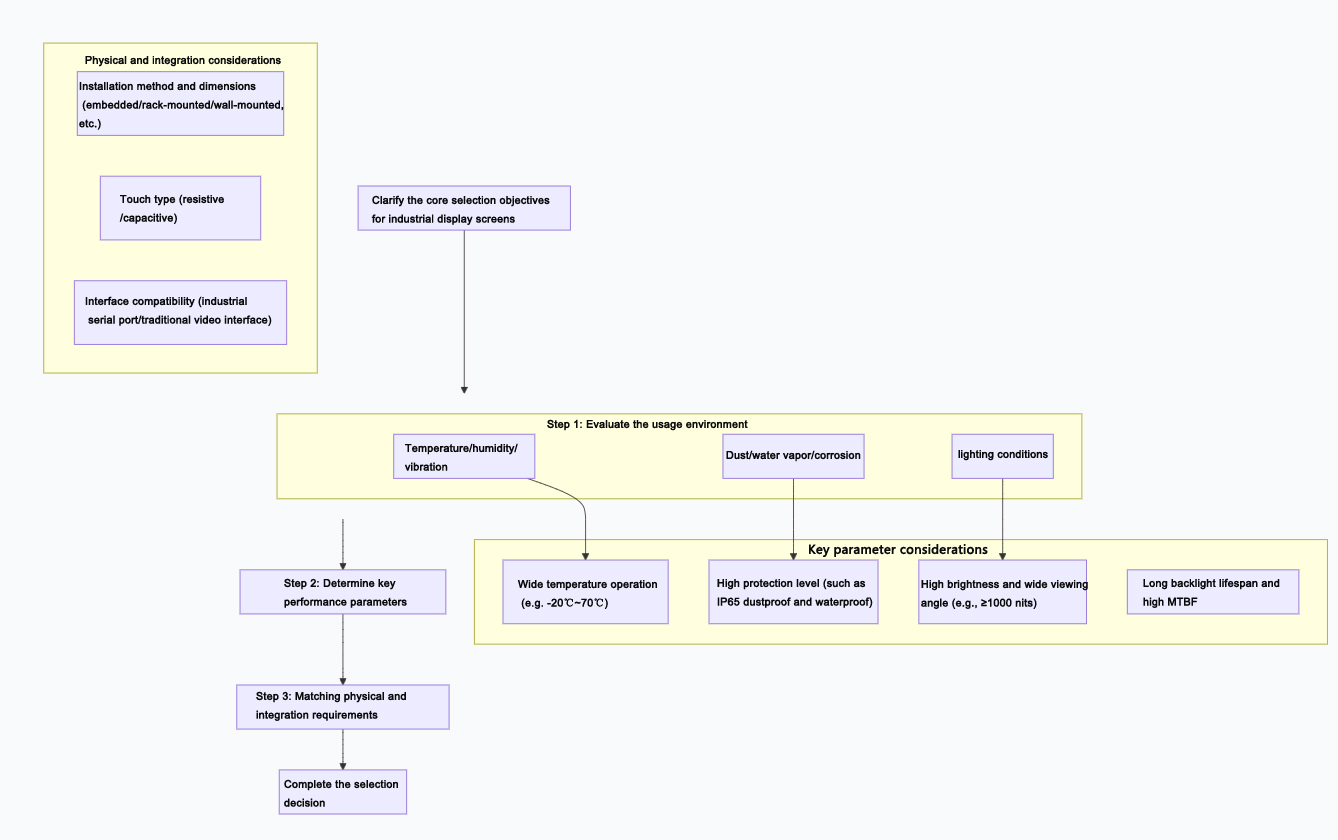
The key to choosing an industrial display is to ensure that it can perform display tasks stably, reliably, and clearly in a specific industrial environment. This is far more than just "choosing a screen"; it's a systematic project. To help you clarify your thoughts, I have outlined the following core selection steps and considerations for you:
In-depth interpretation of core selection dimensions
After completing the above steps, you need to focus on the specific parameters of the following dimensions:
1. Environmental adaptability and reliability (the foundation of industrial grade)
Wide temperature operation: Ensure that the display screen can be started and operated normally under extreme temperatures on site (such as -20℃ to 70℃).
Protection level: Measured by IP (Ingress Protection) rating. For example, IP65 indicates complete dustproof and protection against low-pressure water spray. It is a must-have in oily, humid, or cleaning environments.
Vibration and shock resistance: In scenarios such as machine tools and vehicle-mounted applications, it is necessary to ensure that the display screen can withstand continuous vibration and occasional shocks (parameters such as: vibration resistance 5~500Hz/2G).
Durability: Industrial screens often require uninterrupted operation 24/7. Attention should be paid to the backlight lifespan (typically ≥50,000 hours) and mean time between failures (MTBF, typically ≥50,000 hours).
2. Optical and display performance (the core of clear visibility)
Brightness: Indoor environments typically require a brightness of 300-450 cd/m², while areas near windows or under strong light may require 700-1000 cd/m². In direct outdoor sunlight, a brightness of over 1500 cd/m² may be necessary.
Contrast ratio: A high contrast ratio (such as 1000:1) can enhance readability under complex lighting conditions.
Viewing angle: A wide viewing angle (178° horizontal/vertical) panel should be chosen to ensure no discoloration or dimming when viewed from different angles.
Resolution and size: Select based on viewing distance and information density. There is no need to blindly pursue 4K for control interfaces, but high resolution is required for large monitoring screens to ensure details.
3. Physical and integration characteristics (fit and connect)
Touch function:
Resistive type: strong anti-interference, operable with gloves and stylus, resistant to dirt, suitable for harsh environments.
Capacitive: Supports multi-touch, feels good, but usually requires bare hands or specialized conductive gloves, and is sensitive to water stains and oil stains.
Interface compatibility: Confirm whether the output interfaces of existing devices (such as VGA, DVI, HDMI, DP) are supported, and whether RS-232/485 serial ports are required for screen parameter control.
Installation method: It is necessary to confirm the installation conditions on site in advance, whether it is to be embedded into a panel, mounted on a rack, hung on a wall, or placed on a desktop.
Quick selection comparison table for different scenarios
You can quickly identify the key focus of your scenario based on the table below:
Application scenarios | Core challenge | Primary consideration | Recommended screen type/features |
Factory workshop/production line control | Dust, vibration, oil contamination, continuous operation | High protection level (IP65), vibration resistance, wide temperature range, long lifespan | Industrial reinforced LCD screens often opt for resistive touch and embedded installation |
Equipment control cabinet/automation integration | Compact space, compatible with existing systems | Precise matching of installation dimensions, interface compatibility, and heat dissipation design | Rack-mount (19-inch standard) or customized front panel |
Outdoor/semi-outdoor information display board | Direct sunlight, rain and snow, and large temperature differences | Ultra-high brightness (≥1500 cd/m²), high protection level (IP65), and good temperature control | Outdoor high-brightness LED display or outdoor dedicated LCD screen |
Monitoring/Dispatch Command Center | Multiple signal sources, prolonged gaze, large screen | Large size, high resolution, color consistency, low latency, narrow seam (such as tiled display) | Professional large screen (LCD or LED splicing wall) |
Reminder on key points of procurement and implementation
Clarify core requirements and budget: Clearly define the mandatory indicators that must be met and the additional features that are desired, and prioritize reliability within the budget.
Select reliable suppliers: Prioritize brands that have a good reputation in the industrial field, can provide complete technical documentation, offer localized support, and guarantee long-term supply.
Calculate the total cost of ownership: In addition to the purchase price, it is also necessary to consider the comprehensive costs of installation and commissioning, energy consumption, subsequent maintenance, spare parts inventory, and future upgrades.
If you could inform me of the specific environment where the display screen is planned to be used (for example, whether it's an indoor automated production line or an outdoor dock) and what content it will primarily display, I can provide you with a more targeted analysis.
AUO LCD DISPLAY:https://www.idtdisplay.com/products/AUO_LCD_Displays/