What is the difference between resistive touch screens and capacitive touch scre

resistive is the rugged, versatile, and cost-effective specialist, while capacitive is the sleek, responsive, and user-friendly standard for modern consumer devices
What is the difference between resistive touch screens and capacitive touch screens? This is a fundamental question in touch technology. The simplest way to understand the difference is:
Resistive screens respond to pressure. They feel like a soft, flexible plastic surface.
Capacitive screens respond to electrical conductivity (like your finger). They feel like a hard, smooth glass surface.
Here is a detailed breakdown of their differences, perfect for understanding which is best for your project.
At a Glance: Resistive vs. Capacitive
Feature | Resistive Touch Screen | Capacitive Touch Screen |
Working Principle | Pressure Sensing. Two flexible layers are pushed into contact. | Charge Sensing. Disturbs the screen's electrostatic field. |
Input Method | Any Object: Finger (gloved or not), stylus, pen. | Conductive Objects Only: Bare finger, special capacitive stylus. |
Multi-Touch | Typically single-touch only. Basic multi-touch is possible but rare. | Native support for multi-touch (pinch, zoom, rotate). |
Image Quality | Lower clarity and brightness due to multiple layers. | Excellent clarity and color because the touch layer is fused to the glass. |
Durability | Prone to scratches (plastic surface). Can wear out over time. | Highly durable and scratch-resistant (glass surface). |
Environmental | Highly resistant to water, dust, and vapors. | Can malfunction from water, moisture, or other conductive contaminants. |
Precision | Very high precision, good for handwriting with a stylus. | Very high precision, but may have less fine-point accuracy without a stylus. |
Cost | Very low cost to manufacture. | More expensive to manufacture. |
Detailed Explanation
Resistive Touch Screens (The "Pressure-Based" Workhorse)
How it Works: Imagine a sandwich. It has two thin, flexible conductive layers separated by tiny invisible dots. When you press the top layer, it bends and touches the bottom layer. The controller calculates the touch point based on this electrical contact.
Pros:
Low Cost: Ideal for budget-conscious projects.
Universal Input: Works with any object—finger, glove, stylus, pen. This is its biggest advantage in industrial or medical settings.
High Resistance to Contaminants: Unaffected by water, dust, or grease on the screen, making it suitable for factories, hospitals, and restaurants.
Cons:
Poorer Image Quality: The multiple layers reduce light transmission, making the display look dimmer and less vibrant.
Less Durable: The soft plastic surface can be scratched, and the flexing can lead to wear and tear over time.
No True Multi-Touch: Cannot natively recognize two or more simultaneous touches.
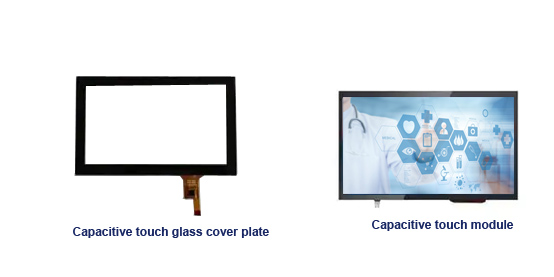
Capacitive Touch Screens (The "Modern & Responsive" Standard)
How it Works: The screen is coated with a transparent conductive material (like Indium Tin Oxide). This creates a uniform electrostatic field across the panel. When your finger (a conductor) touches the screen, it distorts this field. The controller senses this distortion at specific points to determine the touch location.
Pros:
Excellent Clarity & Responsiveness: Provides a very clear, bright image and feels extremely responsive to the touch.
Multi-Touch Support: Natively supports gestures like pinch-to-zoom and two-finger rotate.
High Durability: The glass surface is highly scratch-resistant and can withstand millions of touches.
Cons:
Only Works with Fingers/Stylus: Does not work with a standard stylus or while wearing most gloves (unless they have conductive fingertips).
Higher Cost: More expensive to produce and repair.
Sensitive to Interference: Can malfunction due to water droplets or other conductive materials on the screen.
Which One Should You Choose? A Quick Guide
Choose a RESISTIVE Screen if:
Your project has a very low budget.
Users will be wearing gloves (e.g., factory workers, surgeons).
You need precise input with a stylus or pen (e.g., signature capture, handwriting).
The environment has a lot of moisture, dust, or grease (e.g., a kitchen POS system, industrial HMI).
Choose a CAPACITIVE Screen if:
User experience is a priority (e.g., smartphones, tablets, interactive kiosks).
You need multi-touch gestures (pinch, zoom, etc.).
You want the best possible image clarity.
The primary input will be a bare finger.
In summary, resistive is the rugged, versatile, and cost-effective specialist, while capacitive is the sleek, responsive, and user-friendly standard for modern consumer devices.