What is the RGB interface for industrial screens?

RGB interface: It s like someone directly handing pure red, green, and blue pigments (raw signals) to the painter, who (the driver chip on the screen) mixes them on site, and finally presents various colors on the canvas (screen)
Previously, the LVDS interface was introduced. Today, we will provide a detailed introduction to the RGB interface in industrial LCD screens. It is a very basic and important interface type.
I The RGB interface, as the name suggests, directly transmits the "raw materials" of image signals - red, green, and blue color components - to the LCD screen.
You can imagine it as a painter and his palette:
RGB interface: It's like someone directly handing pure red, green, and blue pigments (raw signals) to the painter, who (the driver chip on the screen) mixes them on site, and finally presents various colors on the canvas (screen).
Other interfaces (such as LVDS): It seems like someone has pre-set various colors (packaged as serial data), and the painter can simply use and apply them.
II Working principle and physical structure
The RGB interface adopts a "parallel transmission" approach, which means it has many independent wires to transmit signals simultaneously.
Signal composition
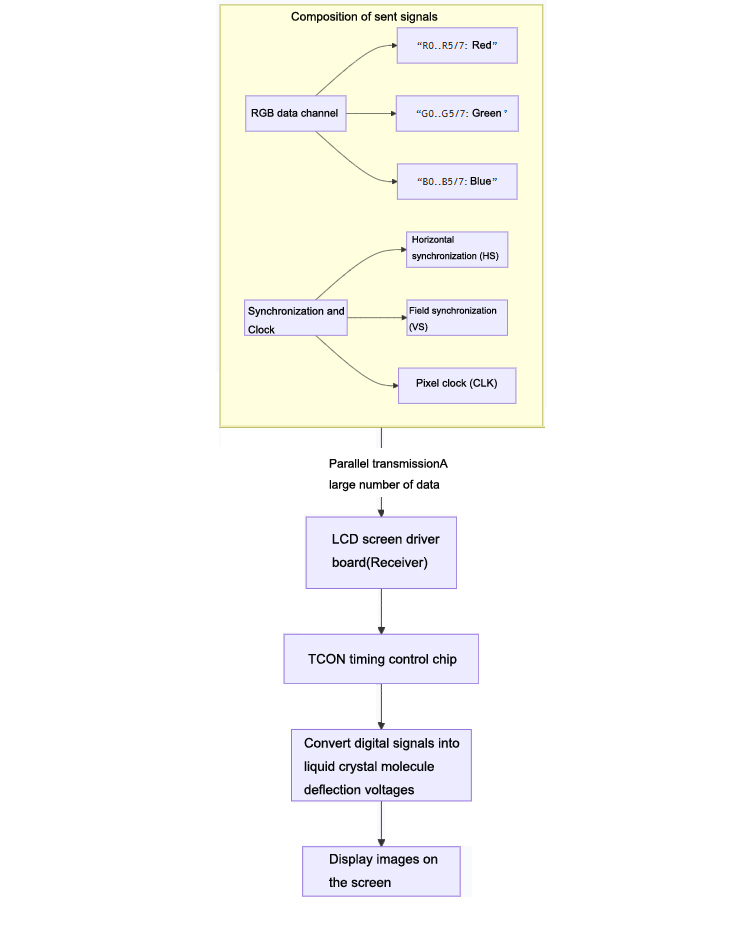
RGB data cable: This is the most important part. For the most common 6-digit screens, there are R0~R5 (6 red signal lines), G0~G5 (6 green signal lines), and B0~B5 (6 blue signal lines). This is a total of 18 data cables. For an 8-bit screen, there are 8 cables each, for a total of 24 data cables. The higher the number of digits, the richer the colors that can be expressed.
Synchronous signal line:
Line synchronization: Tell the screen: "Start drawing a new line
Scene synchronization: Tell the screen: "Start drawing a new frame (the entire picture)
Clock signal: Like a metronome, it ensures that the sending and receiving ends are synchronized and data is read at the correct time.
physical interface
On the driver board of industrial screens, the RGB interface is usually a single or double row pin socket with a large number of pins (usually 40pin, 45pin, 50pin, etc.).
A ribbon cable is usually a very wide, flexible flat cable.
The following figure clearly illustrates the parallel transmission architecture of RGB interface signals:

III. Main advantages and disadvantages
Advantages:
Direct signal and extremely low latency: Due to the fact that the signal does not require complex packaging and encoding, and the transmission path is simple, it is theoretically one of the connection methods with the lowest latency.
Flexible design: For system integrators, they can directly control the original image signals and integrate them into specific chip solutions.
Disadvantages:
Signal susceptibility to interference: There are many parallel lines and they work synchronously. During high-speed transmission, crosstalk is prone to occur between signal lines, and clock signals are highly sensitive to jitter, resulting in image ghosting and noise.
Short transmission distance: Due to its weak anti-interference ability, the RGB interface is not suitable for long-distance transmission and is usually limited to within a few tens of centimeters between the motherboard and the screen.
Complex connectors: With a large number of pins, connectors are bulky and relatively expensive.
IV. Comparison between RGB interface and LVDS interface
Feature | RGB interface | LVDS接口 |
Signal type | Parallel analog signal | Serial differential signal |
Cable quantity | Very many (>30 are common) | Very few (usually only 4 pairs of data lines+1 pair of clock lines) |
Anti-interference | Weak | Extremely strong |
Transmission distance | Short | longer |
Complexity | Complex hardware connections | Simple hardware connection |
Typical Applications | Early or specific embedded systems, car infotainment systems, microcontroller direct drive | Mainstream industrial control screens, laptops, and general display devices |
V. Application scenarios in the industrial field
Although LVDS and eDP have basically replaced RGB interfaces in the large-scale general consumer field, RGB interfaces still have their vitality in industrial control and specific embedded fields:
Low end or specific function industrial control screens: Many screen modules designed for specific microcontrollers or embedded processors still use RGB interfaces because the main chip directly provides RGB output.
In cost sensitive situations: In simple applications that do not require long-distance transmission and extremely high resolution, the RGB scheme may have a cost advantage.
Car display screen: Many car central control screens also use RGB interfaces, which are directly connected to the car's main control chip.
Summary: RGB interface is a "primitive" but "direct" parallel analog signal interface in industrial screens. It is suitable for embedded display applications that are short distance, low-cost, delay sensitive, and driven by specific controllers. However, its weak anti-interference ability and complex cables have led it to be replaced by more advanced LVDS and eDP interfaces in most situations.
AUO LCD Display:https://www.idtdisplay.com/products/AUO_LCD_Displays/
INNOLUX LCD Display:https://www.idtdisplay.com/products/innolux-lcd/