How to Judge Whether the LCD Screen is Damaged by High Temperature

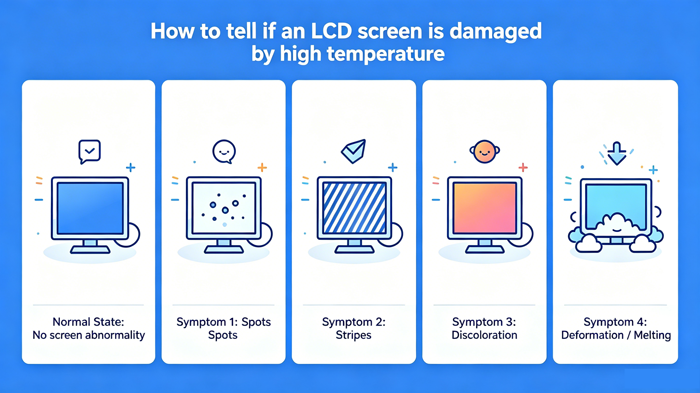
The screen displays clearly, with uniform color, no spots, no stripes, and no display distortion High Temperature Damage Symptoms 1 Screen Spots & Blotches 2 Abnormal Stripes & Flickering 3 Screen Discoloration & Color Cast
How to Judge Whether the LCD Screen is Damaged by High Temperature
Normal State
The screen displays clearly, with uniform color, no spots, no stripes, and no display distortion.
High Temperature Damage Symptoms
1. Screen Spots & Blotches
Irregular black spots, white spots or yellow-brown burn marks appear on the display area. These marks cannot be eliminated after the screen cools down, which is the typical permanent damage caused by high-temperature scalding of the liquid crystal layer.
2. Abnormal Stripes & Flickering
Vertical or horizontal colored stripes, water ripples or continuous screen flickering appear. High temperature will damage the internal circuit and pixel driving layer of the screen, resulting in unstable display signal and irreversible stripe failure.
3. Screen Discoloration & Color Cast
The overall or local color of the screen is distorted, with obvious yellowing, bluing or darkening. High temperature aging causes damage to the backlight module and color filter layer, leading to inconsistent color reproduction.
4. Shell & Screen Deformation / Melting
The screen frame, glue layer or polarizer is deformed, warped, blistered or slightly melted. Extreme high temperature will destroy the structural accessories of the LCD screen, causing gaps and light leakage on the screen.
Special attention
Distinguishing from physical impacts: The black spots affected by impacts are usually radial or have stress points at the center of cracks, while high-temperature black spots have blurred boundaries and no stress cracks.
Low pressure/high temperature composite fault: Some black spots may temporarily shrink after the temperature drops, but reappear after heating, indicating that the seal has been damaged and will eventually deteriorate.
Touch function: Some capacitive screens may experience touch drift or no response after high temperature (due to changes in ITO layer resistance).
Urgent handling and conclusion
If it is confirmed that the damage is caused by high temperature and cannot be repaired on its own, the only option is to replace the screen. Continuing to use may exacerbate damage or cause a short circuit.
Mild yellowing may sometimes partially recover after cooling, but long-term reliability decreases.
Prevention: Avoid working or storing equipment in environments above 50 ℃ for extended periods of time, especially in vehicles or near kitchen equipment during summer.
If black liquid seeps out or smoke appears on the screen, immediately turn off the power and stay away from flammable materials - this indicates that the LCD box has ruptured and there may be a small amount of irritating gas (although not highly toxic, ventilation is required).
If you are unsure whether it is due to high temperature or other aging (such as prolonged use of screen burn-in), you can compare it with normal equipment of the same model, or observe it again after being placed in a cold state (25 ℃) for 2 hours. High temperature damage usually does not completely disappear due to cooling.
Industrial control LCD screen:https://www.idtdisplay.com/
INNOLUX LCD Screen:https://www.idtdisplay.com/products/innolux-lcd/