Which is better between resistive touch screens and capacitive touch screens?

Capacitive delivers the best user experience for finger-based interaction, while Resistive is the rugged, versatile, and cost-effective specialist for challenging environments Choose based on your users, environment, and budget
Which is better between resistive touch screens and capacitive touch screens?Excellent question. The answer isn't about one being universally "better," but about which one is the right tool for the job.
Think of it like this: Is a forklift better than a sports car? It depends entirely on whether you're moving pallets in a warehouse or trying to win a race.
Here’s a quick guide to help you decide:
Choose a Resistive Screen if your priority is low cost, use with gloves or a stylus, or operation in harsh, dirty environments.
Choose a Capacitive Screen if your priority is a superior user experience, multi-touch gestures, high clarity, and modern aesthetics.
The Short Answer
For most modern consumer devices like smartphones and tablets, capacitive touch screens are definitively better due to their responsiveness, clarity, and multi-touch support.
However, for many industrial, medical, and specialized commercial applications, resistive touch screens are often the better choice because of their durability, ability to work with any input, and lower cost.
Detailed Comparison & Decision Guide
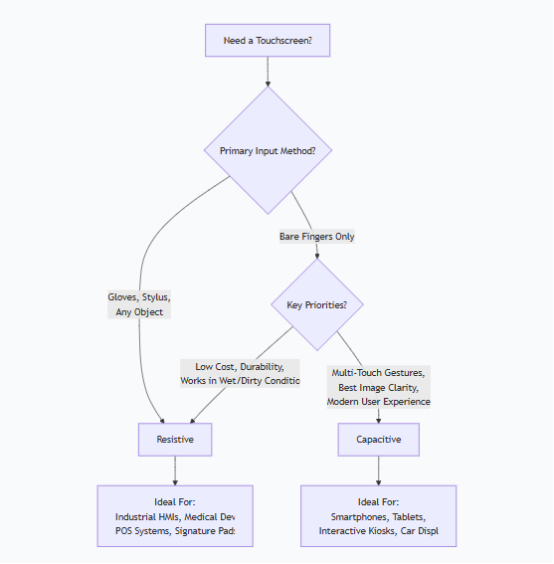
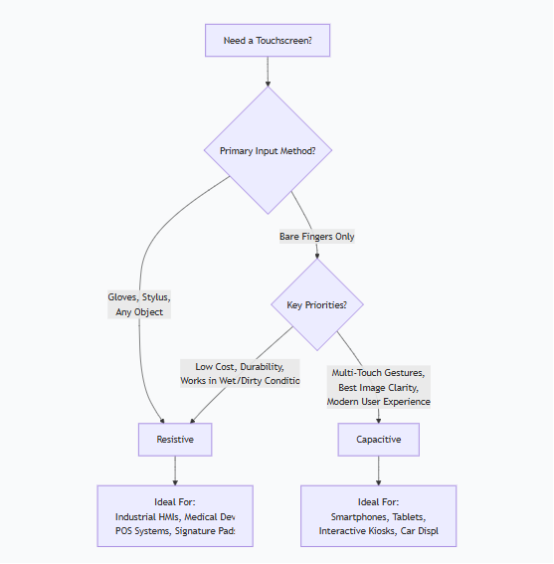
To make the best choice, you need to consider your specific needs. The following flowchart breaks down the key decision points:
Real-World Application Examples
You should choose a RESISTIVE touch screen for:
Factory Floor HMIs: Where operators wear gloves.
Medical Devices: For use in sterile environments where gloves are mandatory.
POS Systems in Restaurants: Where spills and grease are common, and employees need to use fingernails or a stylus for quick input.
Signature Pads: For precise capture of a signature with a stylus.
Budget-Conscious Projects: Where the lowest possible cost is a primary driver.
You should choose a CAPACITIVE touch screen for:
Smartphones & Tablets: For their sleek look, brilliant display, and intuitive multi-touch gestures.
Public Information Kiosks: To provide a modern, responsive, and user-friendly experience.
Car Infotainment Systems: For a sleek, integrated look and familiar pinch-and-zoom navigation.
Home Appliances & Smart Home Displays: Where a high-quality glass surface fits the modern aesthetic.
In summary: There is no winner-takes-all. Capacitive delivers the best user experience for finger-based interaction, while Resistive is the rugged, versatile, and cost-effective specialist for challenging environments. Choose based on your users, environment, and budget.